How to train your Llama – and ChatGPT-3.5 – for a retrieval augmented generation (RAG) task.
September 2023

Fine-tuning LLMs for Retrieval-Augmented Generation
I’ve been working on a pipeline at the cross-roads of retrieval augmented generation (RAG) and Large Language Models (LLMs). You feed in documents – news articles, fresh-off-the-press legislation, or the latest regulations and policies. And it outputs whether they're relevant to your business or organization. We then provide a summary specifically tailored to your business. Think of it as the offspring of Google Alerts where relevance is learned instead of keyword-triggered.
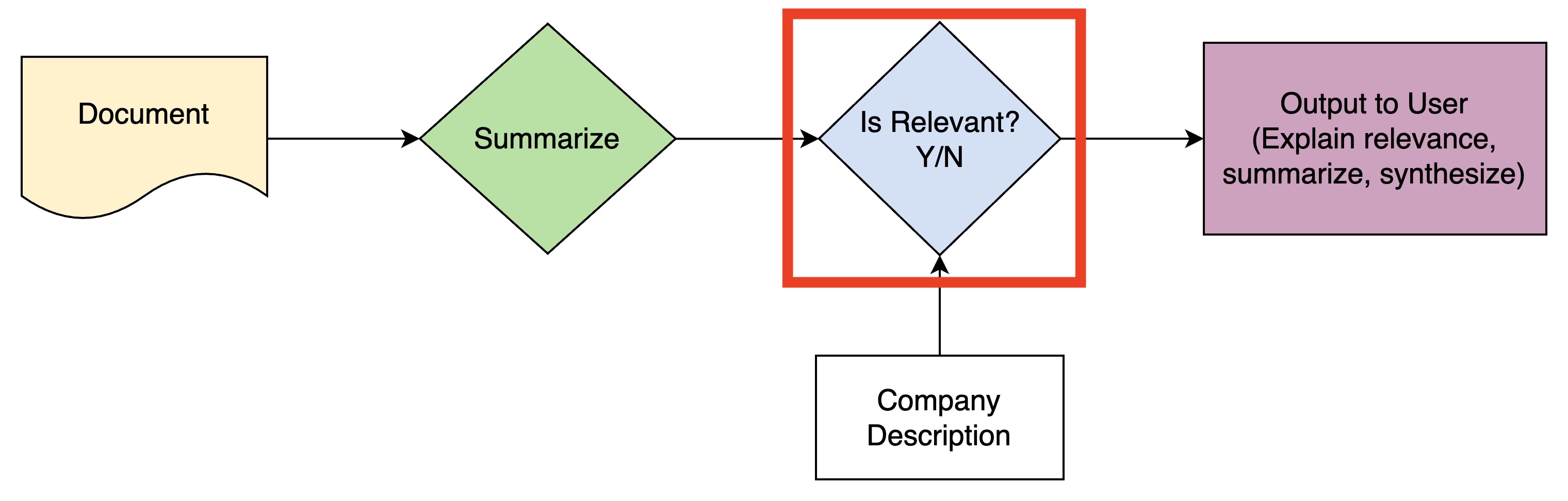
The key step in this pipeline (red box) involves classifying if a document's summary is relevant to a company, based on the company's description. A few baseline ChatGPT queries performed well on this task. But I wanted to push the limits.
In this post, I’ll walk through the journey of enhancing the model to classify relevancy – from prompt engineering to fine-tuning Llama 2 and GPT3.5.
Data Description
I had some data for this problem from early adopters of a tool I was building, who agreed to participate in some experiments with their data, but it wasn’t enough. Luckily, I found a very similar dataset in the Legalbench test suite. In particular, the corporate lobbying dataset is 1 of the 162 subtasks in Legalbench. The goal is to “predict if a proposed bill is relevant to a company given information about the bill and the company”.
An example shows a few key features:
- the texts are long (short enough to fit in a single prompt, but long enough that n-shot learning would strain most model’s context length)
- they match my problem very well.
1# Setup a test set and view the first record:
2
3import datasets  # pip install datasets
4dataset = datasets.load_dataset('nguha/legalbench', 'corporate_lobbying')
5
6# the actual training set is only 10 examples
7train_raw = dataset['train'].to_pandas()
8test_raw = dataset['test'].to_pandas()
9
10# get a sample of 100 from the test set to use for our test set
11test = test_raw.sample(100, random_state=42)
12
13# use the remaining as our train set
14# (the original training set is only 10 examples, which isn't enough)
15train = test_raw.drop(test.index)
16
17# look at the first row
18print(test.iloc[0])
19
Each example has 4 components:
Bill Title: A bill to prevent discrimination and harassment in employment.
Bill Summary: Bringing an End to Harassment by Enhancing Accountability and Rejecting Discrimination in the Workplace Act or the BE HEARD in the Workplace Act
Click to expand (it gets long)
This bill sets forth provisions to prevent discrimination and harassment in the workplace and raises the minimum wage for tipped employees.
Specifically, the bill (1) makes it an unlawful employment practice to discriminate against an individual in the workplace based on sexual orientation, gender identity, pregnancy, childbirth, a medical condition related to pregnancy or childbirth, and a sex stereotype; (2) prohibits employers from entering into contracts or agreements with workers that contain certain nondisparagement or nondisclosure clauses; (3) prohibits predispute arbitration agreements and postdispute agreements with certain exceptions, and (4) establishes grant programs to prevent and respond to workplace discrimination and harassment, provide legal assistance for low-income workers related to employment discrimination, and establish a system of legal advocacy in states to protect the rights of workers.
Additionally, the bill, among other things requires employers who have 15 or more employees to adopt a comprehensive nondiscrimination policy; requires the Equal Employment Opportunity Commission to provide specified training and resource materials, establish and convene a harassment prevention task force, and establish an Office of Education and Outreach with regard to prohibited discrimination and harassment in employment; requires specified studies, reports, and research on prohibited harassment in employment; and grants employees the right to retain their tips.
- Company Name and Description: Amazon.com, Inc. We are guided by four principles: customer obsession rather than competitor focus, passion for invention, commitment to operational excellence, and long-term thinking.
Click to expand
In each of our segments, we serve our primary customer sets, consisting of consumers, sellers, developers, enterprises, and content creators. In addition, we provide services, such as advertising. We serve consumers through our online and physical stores and focus on selection, price, and convenience. We design our stores to enable hundreds of millions of unique products to be sold by us and by third parties across dozens of product categories. Customers access our offerings through our websites, mobile apps, Alexa, and physically visiting our stores. We also manufacture and sell electronic devices, including Kindle e-readers, Fire tablets, Fire TVs, and Echo devices, and we develop and produce media content. In addition, we offer Amazon Prime, a membership program that includes unlimited free shipping on over 100 million items, access to unlimited streaming of thousands of movies and TV episodes, and other benefits. We fulfill customer orders in a number of ways, including through: North America and International fulfillment and delivery networks that we operate; co-sourced and outsourced arrangements in certain countries; digital delivery; and through our physical stores. We offer programs that enable sellers to grow their businesses, sell their products in our stores, and fulfill orders through us. We earn fixed fees, a percentage of sales, per-unit activity fees, interest, or some combination thereof, for our seller programs. We serve developers and enterprises of all sizes, including start-ups, government agencies, and academic institutions, through our AWS segment, which offers a broad set of global compute, storage, database, and other service offerings. We serve authors and independent publishers with Kindle Direct Publishing, an online service that lets independent authors and publishers choose a royalty option and make their books available in the Kindle Store, along with Amazon's own publishing arm, Amazon Publishing. We also offer programs that allow authors, musicians, filmmakers, skill and app developers, and others to publish and sell content. Our businesses encompass a large variety of product types, service offerings, and delivery channels. The worldwide marketplace in which we compete is evolving rapidly and intensely competitive, and we face a broad array of competitors from many different industry sectors around the world. We believe that the principal competitive factors in our retail businesses include selection, price, and convenience, including fast and reliable fulfillment. Additional competitive factors for our seller and enterprise services include the quality, speed, and reliability of our services and tools, as well as customers' ability and willingness to change business practices. They may secure better terms from suppliers, adopt more aggressive pricing, pursue restrictive distribution agreements that restrict our access to supply, direct consumers to their own offerings instead of ours, lock-in potential customers with restrictive terms, and devote more resources to technology, infrastructure, fulfillment, and marketing. Fourth quarter 2017 results include revenue attributable to Whole Foods Market, which we acquired on August 28, 2017. Competition for qualified personnel in our industry has historically been intense, particularly for software engineers, computer scientists, and other technical staff.
- Relevance: Yes
The objective is really a classification problem: output the string "Yes" or "No" to indicate if the bill is relevant to the company.
Baseline Evaluation with GPT-3.5: Zero-shot and 1-shot Prompting
My first step was to try Zero-shot and 1-shot prompting with GPT-3.5. For Zero-shot, I used the following prompt:
BASE_PROMPT_CORPORATE_LOBBYING = """You are a lobbyist analyzing Congressional bills for their impacts on companies.
Given the title and summary of the bill, plus information on the company from its 10K SEC filing, it is your job to determine if a bill is at least somewhat relevant to a company in terms of whether it could impact the company's bottom-line if it was enacted (by saying YES or NO; note the all-caps).
Official title of bill: {bill_title}
Official summary of bill: {bill_summary}
Company name: {company_name}
Company business description: {company_description}
Is this bill potentially relevant to the company? FINAL ANSWER:"""
Because the text is so long, I couldn't do more than 1-shot prompting. In fact, it was really difficult to add one example into each prompt. I initially tried randomly sampling examples from the training set to append before the BASE_PROMPT_CORPORATE_LOBBYING. The intuition was to give the model sufficient diversity. But the texts were so long that I ran out of tokens and hit the dreaded This model's maximum context length is 4097 tokens, however you requested XXXX tokens error. So I settled on using the shortest example in the training data: I appended the ground truth answer, and concatenated it with the BASE_PROMPT_CORPORATE_LOBBYING. This kept me just below the 4096 token limit for most models.
I really wanted to try Chain of Thought (CoT) on this problem ("Chain-of-Thought Prompting Elicits Reasoning in Large Language Models", 2022 Jan, arxiv). My thinking was CoT would allow the model to reason out why a document would be relevant to a company. But the token limit was too much of a problem. There are better ways to solve this by extending a RAG pipeline or creating agents, so I'll save that for another day.
To evaluate the Zero-shot and 1-shot prompts, I used the openai_multi_client library, which makes calling the OpenAI API in parallel very easy (along with handling exceptions and retrying).
from openai_multi_client import OpenAIMultiOrderedClient
import pandas as pd

BASE_PROMPT_CORPORTATE_LOBBYING = ...

# setup the openai_multi_client api
api = OpenAIMultiOrderedClient(
    endpoint="chats",
    data_template={"model": "gpt-3.5-turbo"})

def eval_corporate_lobbying():

    # iterate thru rows in the dataframe
    for _, row in test.iterrows():

        # format the prompt
        query = BASE_PROMPT_CORPORTATE_LOBBYING.format(
            bill_title=row['bill_title'],
            bill_summary=row['bill_summary'],
            company_name=row['company_name'],
            company_description=row['company_description'],
        )

        # form up the request to OpenAI
        api.request(data={
            "messages": [{
                "role": "user",
                "content": query
            }]
        }, metadata={'query': query})

# execute the calls in parallel
api.run_request_function(eval_corporate_lobbying)

# append results to a list
results = []
for result in api:
    query = result.metadata['query']
    response = result.response['choices'][0]['message']['content']
    results.append(response)
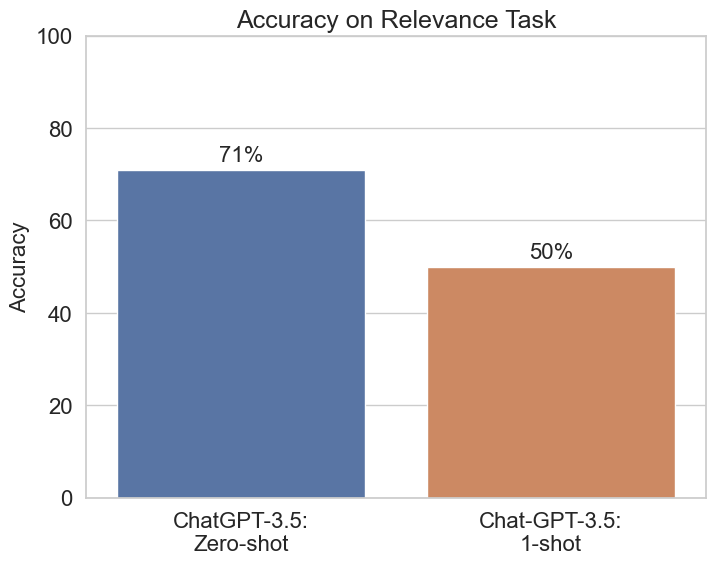
The results were striking!
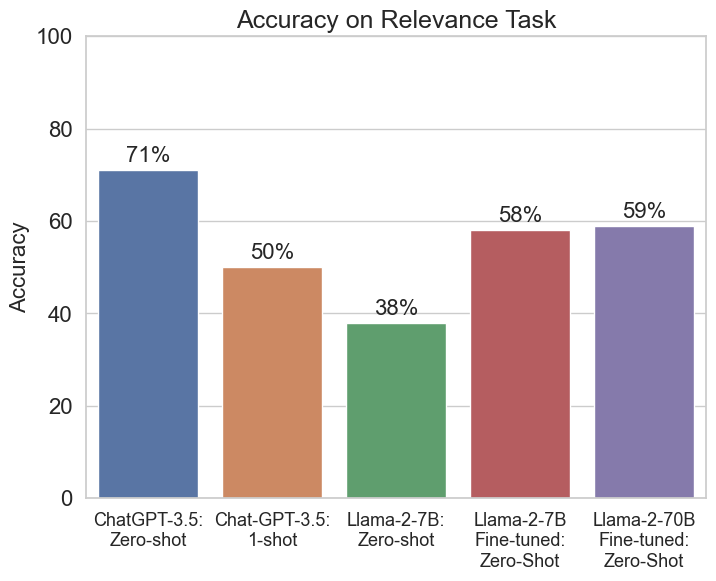
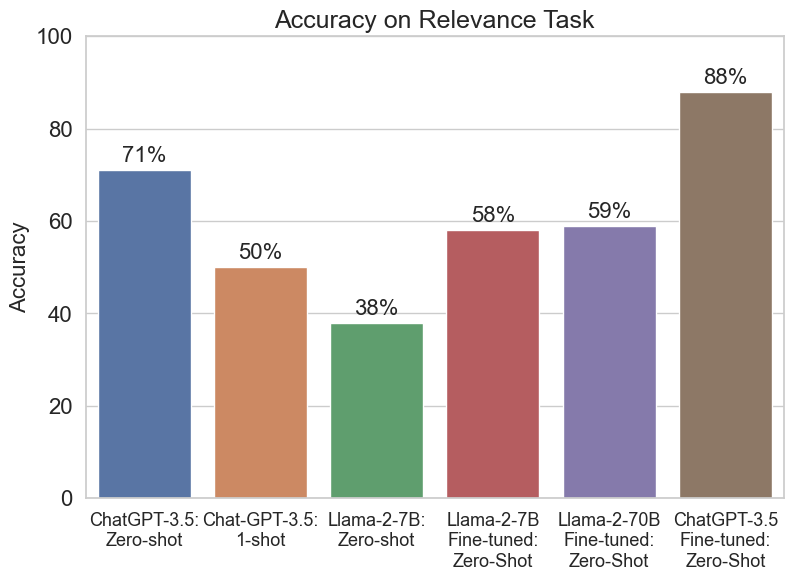
I’ve never seen 1-shot prompting (50% accuracy) perform so much worse than zero-shot (71% accuracy). Essentially, 1-shot prompting is no better than a coin flip. And if we consider the actual class balance was 66% “No” and 34% “Yes”, it’s even further off the mark. (Because this evaluation was just prompting and wasn't trained, the system doesn't have access to the base rates for each class. As such, the uniform prior – 50/50 – is probably the right baseline to evaluate it against.)
Why was 1-shot prompting so much worse?
I’m reminded of the “Lost in the Middle” paper ("Lost in the Middle: How Language Models Use Long Contexts", 2023 Jul, arxiv). In the figure from their paper (below), they found strong position effects in GPT-3.5 (gpt-3.5-turbo-0613) when doing multi-document question answering and key-value retrieval with long contexts. When relevant information was at the beginning or the end of a context, performance was higher. When it was in the middle, the model performed worse.
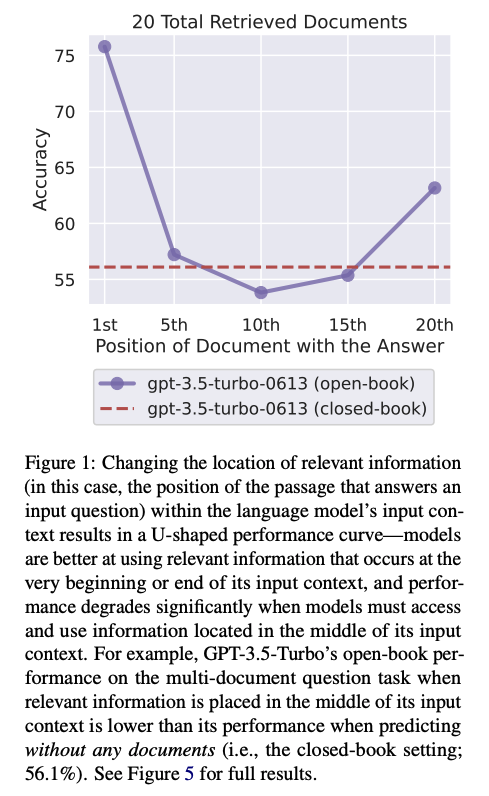
Particularly relevant to my results: when the key information was in the middle (10th) position, it did slightly worse than "closed-book" (analogous to my Zero-shot finding here). I suspect something similar is happening in my results–just in a more extreme way! The transition between the example and the document I care about happens almost exactly in the middle of the context. It's likely the model is mixing up content from both the example and the document and doing a lot worse as a result. I've seen similar behavior in RAG systems with multiple summaries stuffed into 1 large prompt.
Fine-tuning Llama-2 Models
I next turned to fine-tuning Llama-2.
There are a few key decisions to make when fine-tuning:
- Where to train it?
- How to set up the data?
- How to efficiently train the model?
- Loading the model
- Setting up training
1. Where to train it?
Given that I’m a member of the GPU-Poor, I used one of the cloud providers in Table 1. For the smallest 7B Llama 2 model, I trained it on an ml.g5.xx instance on AWS Sagemaker, which has an A10G with 24 GB of GPU RAM. Even though it’s not the most cost-effective, the ability to shutdown an instance, save its state, and then restart it is very useful when prototyping over the weekend.
For the larger 70B Llama 2 model, I used an H100 with 80 GB of GPU RAM on Vast.ai, which was the cheapest available at the time.
In both cases, I selected the chat models (7B, 70B) that were trained using Reinforcement Learning with Human Feedback. There’s basically no reason to select the base model.
| LLM | Llama-2 7B | Llama-2 70B | Note |
|---|---|---|---|
| GPU RAM needed (after quantization) | ~14 GB | ~35 GB | |
| AWS Sagemaker ml.g5 (A10G GPU) | 24 GB; ~$1.2/hr | ❌ | "shut down" allows you to save state and pick up again |
| Colab V100 | 16 GB | ❌ | |
| Colab T4 | 14 GB | ❌ | |
| Colab A100 | 40 GB | ❌ | If lucky enough to allocate one, you should also play the lottery. |
| Lambda Labs A10 | 24 GB, ~$0.6/hr | ❌ | |
| Runpod A100 | - | 80 GB, ~$2/hr | Usually available |
| Lambda Labs H100 | - | 80 GB, ~$2/hr | I haven't seen these available since Q1/Q2 2023. |
| Vast.ai A100/H100 | - | 80 GB, ~$1-3/hr | Highly market dependent |
| Runpod H100 | - | 80 GB, ~$4.3/hr | Usually available |
2. How to set up the data?
There has been a lot of confusion about how to prompt Llama 2 (see here, for example).
On Facebook’s llama-recipes github repo, they seem to use a variety of formats. For example, they use the Stanford Alpaca dataset in this setup file, which uses the standard format:
### Instruction:\n{instruction}\n\n### Input:\n{input}\n\n### Response:
Huggingface’s “How to Prompt Llama 2” page instead recommends the following structure:
<s>[INST] <<SYS>>
{{ system_prompt }}
<</SYS>>

{{ user_message }} [/INST]
To clarify, everything in double brackets “{{ }}” is meant to be replaced, and everything else is treated as a special token.
I’m still not 100% sure this is correct, and I plan to run a few additional tests in the coming days. But I ended up using the following prompt:
FINETUNE_PROMPT_CORPORTATE_LOBBYING = """<s>[INST] <<SYS>>
You are a lobbyist analyzing Congressional bills for their impacts on companies.
Given the title and summary of the bill, plus information on the company from its 10K SEC filing, it is your job to determine if a bill is at least somewhat relevant to a company in terms of whether it could impact the company's bottom-line if it was enacted (by saying YES or NO; note the all-caps).
<</SYS>>
Official title of bill: {bill_title}
Official summary of bill: {bill_summary}
Company name: {company_name}
Company business description: {company_description}
Is this bill potentially relevant to the company? [/INST]{answer}</s>"""
- I’m not sure if the {answer} is at the right spot.
- I’m not sure why Meta's llama-recipes repo doesn’t go into details like this, but instead seems to just use the Alpaca dataset directly.
3. How to efficiently train the model?
It’s pretty standard practice to use Low Rank Adaptation (LoRA) (2021 June) and the more recent Quantized LoRA (QLoRA: Efficient Finetuning of Quantized LLMs, 2023 May). In short, QLoRA quantizes the parameters to a lower precision, and LoRA uses a low rank adapter to make fine-tuning more efficient, among a few other nice memory tricks. Huggingface makes it super easy to set up all the parameters for QLoRA.
First, we install all required libraries:
pip install -q accelerate==0.21.0 \
peft==0.4.0 \
bitsandbytes==0.40.2 \
transformers==4.31.0 \
trl==0.4.7 datasets
And import all libraries:
import pandas as pd
import os
import torch
from datasets import load_dataset
from transformers import (
    AutoModelForCausalLM,
    AutoTokenizer,
    BitsAndBytesConfig,
    HfArgumentParser,
    TrainingArguments,
    pipeline,
    logging,
)
from peft import LoraConfig, PeftModel
from trl import SFTTrainer
Then, we setup the bitsandbytes config. This controls how we handle quantization.
# Load tokenizer and model with QLoRA configuration
compute_dtype = getattr(torch,"float16")
print(compute_dtype)

bnb_config = BitsAndBytesConfig(
    # Replace the Linear layers with 4-bit layers for better memory
    load_in_4bit=True,
    # Quantization type (fp4 or nf4)
    bnb_4bit_quant_type="nf4",
    #
    bnb_4bit_compute_dtype=compute_dtype,
    # Use nested (double) quantization for 4-bit base models
    bnb_4bit_use_double_quant=False,
)
What does each parameter do?
- load_in_4bit: this will handle loading in the Linear layers at 4-bit precision. This is our main memory saving step.
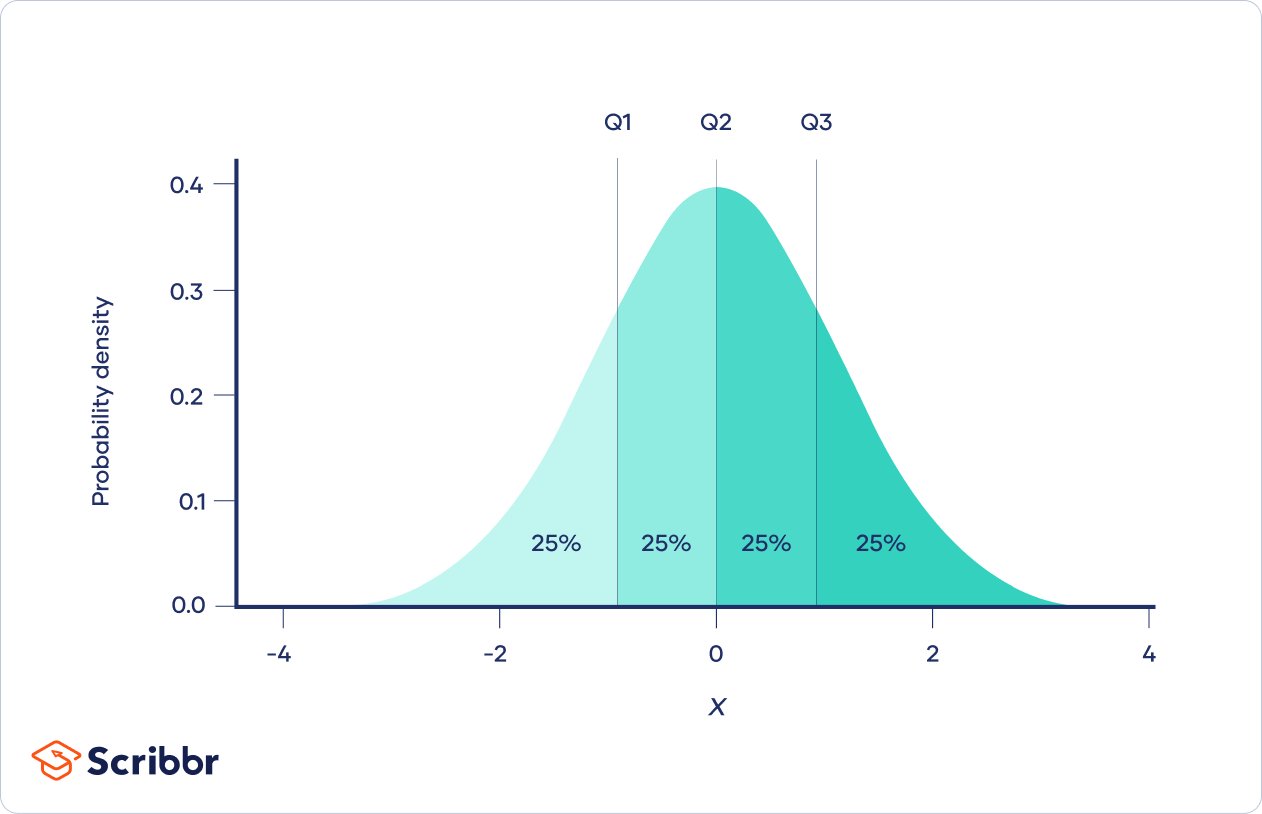
- bnb_4bit_quant_type: This is the datatype used for storing the model weights. The QLoRA paper introduced a new data type called NormalFloat4 (nf4). This is an "information-theoretically optimal data type that ensures each quantization bin has an equal number of values assigned from the input tensor". What does that mean? Because most neural network weights are initialized to , we want to ensure that the 16 possible values from the 4-bit NormalFloat are used as efficiently as possible. We could evenly space them between , for example. But the standard normal has more of its mass around 0. So we should allocate more of our 16-value budget around 0. The intuition is that we should allocate more of our 16 possible values to where different values are more likely to be. This is what makes NormalFloat "information-theoretically optimal". Tim Dettmers' Tweet and image on this are helpful:
- bnb_4bit_compute_dtype: There is a separate precision used for storage (bnb_4bit_quant_type) versus computation (this parameter). Here, we use the standard bfloat16, brain floating point 16 format, for the computation part. More on storage vs. compute below.
- bnb_4bit_use_double_quant: this means we quantize the quantization constants for additional memory savings, admittedly one of the authors calls this "very simple but also silly" (source).
What are the 2 dtypes – storage and compute?
When I first read the QLoRA paper, I was confused how quantizing the base model weights to 4-bit precision still allows you to accumulate enough information from the gradients. The key is to understand that only the base model weights from the original model get quantized to 4-bit precision. Everything else remains in 16-bit precision!
More precisely, the process is as follows:
- The base model weights from Llama-2 are quantized to 4-bit precision and stored.
- At inference time, the 4-bit quantized weights are read from memory and de-quantized to 16-bit floating point precision. There is obviously a loss of information in steps 1 and 2.
- The forward pass is run in 16-bit precision, which gives 16-bit activations.
- The backward pass runs in 16-bit, which gives 16-bit gradients.
- During weight updating, only the LoRA adapter weights are changed. All LoRA adapter weights are in 16-bit, so we don't lose any information from the gradient updates. The 4-bit quantized weights are never updated.
- At end of the iteration, the updated 16-bit LoRA adapters are written in 16-bit back to memory.
Because the gradients and LoRA area all in 16-bit precision, gradient updating can still work well.
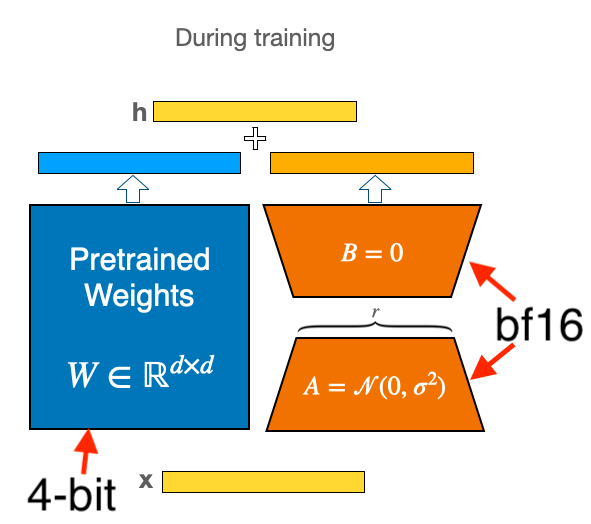
The intuition is: the base model weights get us close to a good region, even after quantization. We're always going to lose information, but quantizing into NormalFloat helps us preserve as much information as possible. Updating the LoRA adapter weights during fine-tuning gives us just enough flexibility to move in the neighborhood of the base model weights and to fine-tune the model without destroying all previous information. Combined with a linear ramp-up in the learning-rate, we should be able to learn in this regime.
For more details, see the Huggingface blogpost (Making LLMs even more accessible with bitsandbytes, 4-bit quantization and QLoRA).
4. Load the model
Now, we're ready to load the model:
# make sure to use the **chat** version
model_name = "meta-llama/Llama-2-7b-chat-hf"

# Load base model
model = AutoModelForCausalLM.from_pretrained(
    model_name,
    quantization_config=bnb_config,
    # Load the whole model on GPU 0
    device_map=device_map = {"": 0}
)
model.config.use_cache = False
model.config.pretraining_tp = 1
And we load the tokenizer, and set up padding:
# Load LLaMA tokenizer
tokenizer = AutoTokenizer.from_pretrained(
    model_name,
    trust_remote_code=True)
tokenizer.pad_token = tokenizer.eos_token
tokenizer.padding_side = "right"
5. Set up Training: LoRA
Then we set up the LoRA configuration:
peft_config = LoraConfig(
    lora_alpha=16,
    r=64,
    lora_dropout=0.1,
    bias="none",
    task_type="CAUSAL_LM",
)
These are pretty standard parameters from the original LoRA paper.
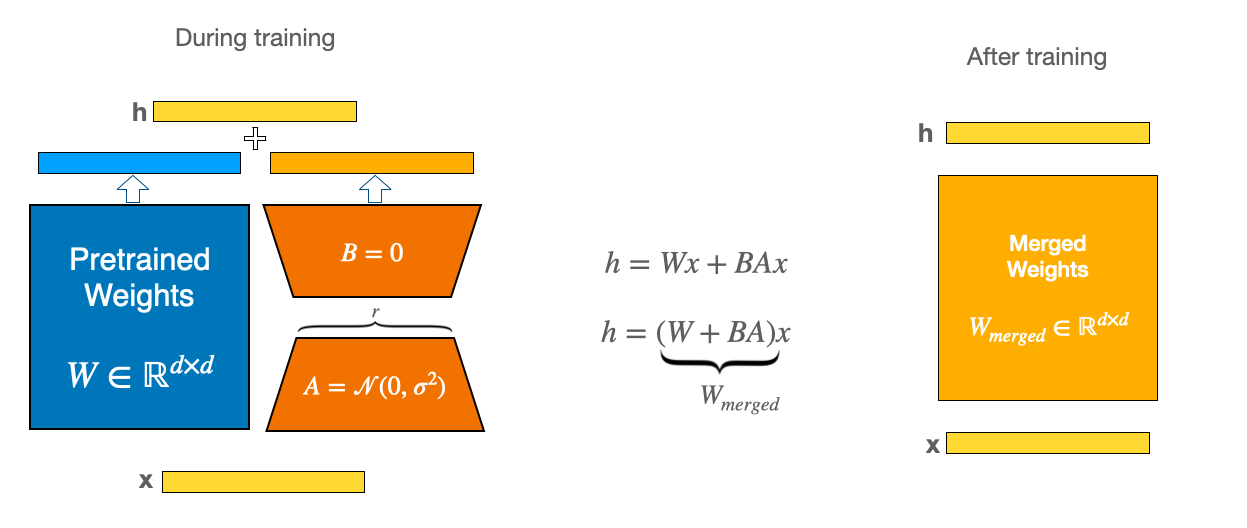
- lora_alpha: how much to pay attention to the LoRA matrix versus the original model weights.
- r: Lora rank. Dimensionality of the LoRA matrix (see figure below).
- lora_dropout: how much dropout to apply to the LoRA matrix.
LoRA works by combining the weights of the original model (blue in the figure, "Pretrained Weights") with the lower rank LoRA matrix (orange, ). The dimensionality, , of the lower-rank matrix is the first parameter. It controls how much smaller is than the full -dimensional pretrained weights. And lora_alpha is how much we weight the LoRA matrix in relation to the pretrained weights. It's a little bit confusing here because the scale of lora_alpha is the same as r. (I would have just made lora_alpha a float where 0 means ignore LoRA and 1 means only pay attention to LoRA.)
The Platypus paper used 16 for lora_alpha and LoRA rank based on their review of other scripts.
LoRA rank defines the dimensions of the low-rank matrices, and LoRA alpha is the scaling factor for the weight matrices. The weight matrix is scaled by , and a higher alpha value assigns more weight to the LoRA activations.
I used less aggressive weighting of the LoRA adapters, setting
For more details, see the Huggingface LoRA guide.
5. Setup training: Bringing it all together
Finally, we're ready to combine all of our training arguments in one place. There are a long list of parameters to set up:
# Set training parameters
training_arguments = TrainingArguments(
    output_dir="./results",
    # training epochs
    num_train_epochs=2,
    # batch size/GPU for training
    per_device_train_batch_size=4,
    # number of update steps to accumulate the gradients
    gradient_accumulation_steps=1,
    # AdamW optimizer
    optim="paged_adamw_32bit",
    # checkpoint every X steps
    save_steps=0,
    # log every X steps
    logging_steps=25,
    # initial LR
    learning_rate=2e-4,
    # weight decay to all layers (except bias/LayerNorm)
    weight_decay=0.001,
    # use precision
    fp16=False,
    bf16=False,
    # gradient clipping
    max_grad_norm=0.3,
    # max training steps (will override anything else)
    max_steps=-1,
    # linear warmup from 0 to learning rate in this fraction of steps
    warmup_ratio=0.03,
    # groups into batches so that they have the same length
    # (this prevents wasting memory on sequences that need a lot of padding to match the longest sentence in the batch)
    group_by_length=True,
    # learning-rate schedule: linear ramp up followed by cosine decay toward 0
    lr_scheduler_type=”cosine”,
    report_to="tensorboard"
)
After applying the transformations to setup the dataset, we're ready to train.
import datasets
dataset = datasets.load_dataset('nguha/legalbench', 'corporate_lobbying')
train_raw = dataset['train'].to_pandas()
test_raw = dataset['test'].to_pandas()

# get a sample of 100 from the test set
test = test_raw.sample(100, random_state=42)

# get remaining test set to use as the train set
train = test_raw.drop(test.index)

FINETUNE_PROMPT_CORPORTATE_LOBBYING = """<s>[INST] <<SYS>>
You are a lobbyist analyzing Congressional bills for their impacts on companies.
Given the title and summary of the bill, plus information on the company from its 10K SEC filing, it is your job to determine if a bill is at least somewhat relevant to a company in terms of whether it could impact the company's bottom-line if it was enacted (by saying YES or NO; note the all-caps).
<</SYS>>
Official title of bill: {bill_title}
Official summary of bill: {bill_summary}
Company name: {company_name}
Company business description: {company_description}
Is this bill potentially relevant to the company? [/INST]{answer}</s>"""

query_list = []
for _, row in train.iterrows():
    query = FINETUNE_PROMPT_CORPORTATE_LOBBYING.format(
        bill_title=row['bill_title'],
        bill_summary=row['bill_summary'],
        company_name=row['company_name'],
        company_description=row['company_description'],
        answer=row['answer'].upper()
    )
    query_list.append(query)

train['text'] = query_list

# form up a single dataset for SFTTrainer:
from datasets import Dataset
train_hf = Dataset.from_pandas(train[['text']])

# setup our trainer
trainer = SFTTrainer(
    model=model,
    train_dataset=train_hf,
    peft_config=peft_config,
    dataset_text_field="text",
    max_seq_length=None,
    tokenizer=tokenizer,
    args=training_arguments,
    # pack short examples into the same input to increase efficiency
    packing=False,
)
To start training, just call:
trainer.train()
And save the model when done:
# Save trained model
trainer.model.save_pretrained('fine-tuned-llama')
6. Results
The results for the baseline Llama-2-7B model with zero-shot prompting were really bad: 38%. Much worse than a coin flip. The fine-tuned 7B and 70B models both did significantly better. But I was surprised the 70B model didn't do better. I tried debugging a few things like the prompt, but I wasn't able to get better results. Typically, we'd explore more hyper-parameters like the learning rate and warm-up schedule.
Fine-tune GPT-3.5
The Llama-2 results led me to turn to fine-tuning gpt-3.5-turbo-0613 using the new Chat-GPT fine-tuning interface.
Data setup is very easy. I used the following prompt:
SYSTEM_PROMPT = '''You are a lobbyist analyzing Congressional bills for their impacts on companies.
Given the title and summary of the bill, plus information on the company from its 10K SEC filing, it is your job to determine if a bill is at least somewhat relevant to a company in terms of whether it could impact the company's bottom-line if it was enacted (by saying YES or NO; note the all-caps).'''
USER_PROMPT = """Official title of bill: {bill_title}
Official summary of bill: {bill_summary}
Company name: {company_name}
Company business description: {company_description}
Is this bill potentially relevant to the company?"""
ANSWER_PROMPT = '''{answer}'''
And then I formatted the data into the required format:
def format_gpt3_input(dataset) -> List[Dict]:
    query_list = []
    for _, row in dataset.iterrows():
        prompt = {}
        system_prompt = {"role": "system", "content": SYSTEM_PROMPT}
        user_prompt = {"role": "user", "content": USER_PROMPT.format(
            bill_title=row['bill_title'],
            bill_summary=row['bill_summary'],
            company_name=row['company_name'],
            company_description=row['company_description']
        )}
        answer_prompt = {"role": "assistant",
            "content": ANSWER_PROMPT.format(
                 answer=row['answer'].upper()
        )}
        prompt['messages'] = [system_prompt, user_prompt, answer_prompt]

        query_list.append(prompt)
    return query_list

query_list_train = format_gpt3_input(train)
query_list_test = format_gpt3_input(test)

# write to file
with open('data/train.jsonl', 'w') as f:
    for item in query_list_train:
        f.write(json.dumps(item) + '\n')

with open('data/test.jsonl', 'w') as f:
    for item in query_list_test:
        f.write(json.dumps(item) + '\n')
The formatting checker was really useful to catch any errors in setting up the data.
0 examples may be over the 4096 token limit,
they will be truncated during fine-tuning
Dataset has ~485860 tokens that will be charged for during training
By default, you'll train for 3 epochs on this dataset
By default, you'll be charged for ~1457580 tokens
See pricing page to estimate total costs
And it also allows you to estimate the final cost. My rough estimates was $11.66:
# pricing page for GPT3: https://openai.com/pricing: $0.0080 / 1K tokens
0.0080 / 1000 * n_epochs * n_billing_tokens_in_dataset
Then you just need to create a File object with OpenAI:
import openai
import os
openai.api_key = os.getenv("OPENAI_API_KEY")

openai.File.create(
  file=open("data/train.jsonl", "rb"),
  purpose='fine-tune'
)
and kick off the fine-tune job:
openai.FineTuningJob.create(training_file=unique_file_id,
                            model="gpt-3.5-turbo")
You can monitor status throughout training by calling
# look up your job id
openai.FineTuningJob.list(limit=10)

# Retrieve the state of a fine-tune
openai.FineTuningJob.retrieve(JOB_ID)

# List up to 10 events from a fine-tuning job
openai.FineTuningJob.list_events(id=JOB_ID, limit=10)
Once training completes, you can simply call it as an endpoint. Again, I wanted to call it in parallel using the openai_multi_client library:
MODEL_NAME = 'ft:gpt-3.5-turbo-0613:org_name::unique_string'

api = OpenAIMultiOrderedClient(endpoint="chats",
                               data_template={"model": MODEL_NAME})

def eval_corporate_lobbying_gpt35_finetune():
    for _, row in test.iterrows():

        query = BASE_PROMPT_CORPORTATE_LOBBYING.format(
            bill_title=row['bill_title'],
            bill_summary=row['bill_summary'],
            company_name=row['company_name'],
            company_description=row['company_description'],
        )

        api.request(data={
            "messages": [
                {
                    "role": "system",
                    "content": SYSTEM_PROMPT
                },
                {
                    "role": "user",
                    "content": query
            }],
            "max_tokens": 10
            #"max_tokens": 4096 - row['token_lengths'] - 1 # subtract 1 for some extra buffer
        }, metadata={'query': query})

api.run_request_function(eval_corporate_lobbying_gpt35_finetune)

results_list = []
for result in api:
    query = result.metadata['query']
    try:
        response = result.response['choices'][0]['message']['content']
    except:
        response = None
    # print(f"{query}:", response)
    results_list.append(response)
Training loss. I'm not sure what to make of the training loss. It immediately goes to 0, and there's a single large spike, before returning to 0. I was almost certain that I had overfit the data or that the training loss wasn't getting reported correctly.
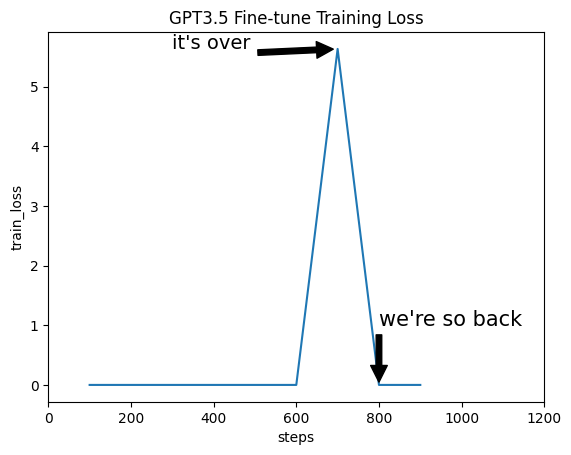
But the results on the test set were very impressive! The fine-tuned GPT-3.5 model blew everything out of the water at 88% accuracy. Legalbench was published in Dec 2022, so I don't think there's any data leakage. Also, that would be captured in the baseline GPT-3.5 prompt, not on the fine-tuned one.
Conclusions
In this post, we've gone through state of the art processes to improve one step in a larger product's pipeline. The best options for now seem to be using our fine-tuned model (at a pretty steep mark-up to the standard GPT-3.5 endpoint).
A few remaining comments and observations:
- GPT-3.5 Fine-tuning is really hard to beat. The API is reliable (my job failed at one point, but automatically restarted), and it produces very competitive results. It exposes a small number of parameters with sane defaults. Great for producing a competitive benchmark rapidly.
- Llama-2 fine-tuning was a bit of a disappointment. I expected more out of it, honestly. There are a ton of knobs and dials in the optimization process. I'm currently tuning more of these for the 70B model, and expect better performance.
- The QLoRA implementation in Huggingface is really smooth, and I didn't run into any OOM issues (in part b/c I biased toward spinning up larger clusters than necessary).
- Another option is to fine-tune the company's information into the model. This would save on prompting each time, and likely lead to higher performance. So you'd have 1 endpoint for each company. The hard part is getting enough training data for this, but certainly doable as we bootstrap data.
- It's important to remember this relevancy model sits within a larger RAG pipeline. What really matters is the performance of the entire end-to-end pipeline, not any single step. As always, if you're not running an end-to-end test harness for your entire RAG pipeline, you're blindly running in the dark. In this case, the better relevancy model did improve my end-to-end test suite. I suspect that the next best step is to focus on better summarization of the articles coming into the relevancy classifier.
References
- for some good early work on RAG see "Retrieval-Augmented Generation for Knowledge-Intensive NLP Tasks", May 2020).